KH100+ User Manual
Lonsdor KH100+ Hand-Held Remote Key Programmer
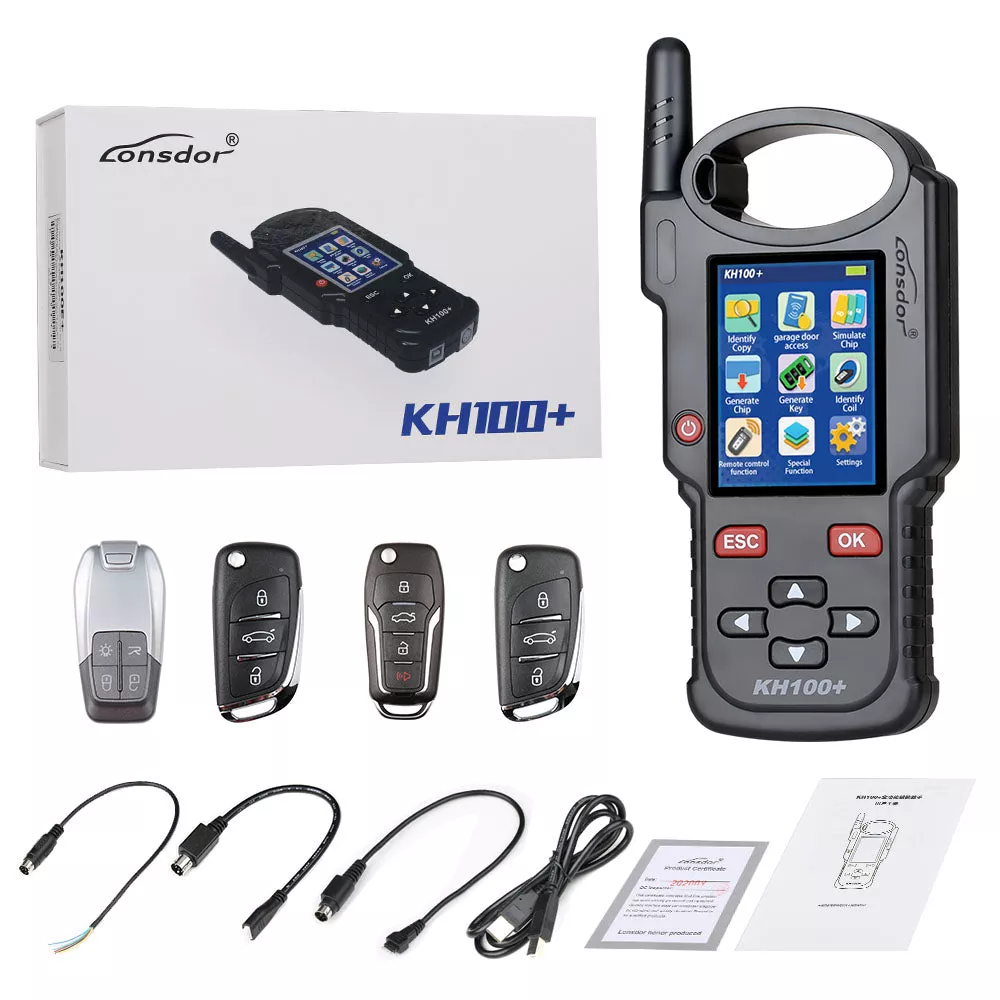
Lonsdor KH100+is a versatile hand-held smart device, able to access control key, simulate/ generate chip, generate remote (key), detect remote frequency, detect IMMO, unlock Toyota smart key and etc.
1. The Lonsdor KH100+ is designed for:
Professional automotive locksmiths
Vehicle key programming specialists
Auto repair workshops
Automotive technicians
Mobile key service providers
Users requiring a portable key chip and remote programming solution
2. Supported Key Functions & Features
Lonsdor KH100+Function List:-Identify Copy-Chip Simulation-Remote Generation-Remote Frequency-Access Control Key-Chip Generation-Coil Identification-Special Function
Lonsdor KH100+Features:-Modern appearance design, in line with the operating habits of the public.-Device system comes with operation instructions, easier for you to use.-It covers almost all the functions of the similar products in the market.-Built-in super sensor to collect data(over-range data collection).-Exclusive support for 8A(H chip) generation.– Built-in WIFI module, can connect to network at any time.Identify/copy/generate chip:
Multi-vendor chips supportedEspecially Toyota 8A(H) chip Our predominance
Generate remote/smart key:
Dedicated connector to generate remote/smart key Online update supportedRemote generation diagramSmart key generation diagramAccess control/remote frequency
One-click identify and copy IC/ID cardsCopy multi-vendor chopsDetect remote frequency bands with high accuracyOne click identify ID card,able to copy multi-vendor chps,at the back sensor area
Detect super frequency
Detect multiple frequency brands with high accuracy3. Lonsdor KH100+Device Components:
| Name | Notes |
| Antenna | To induce simulated chip and detect ignition coil |
| Display screen | 2.8-inch color screen, resolution: 320X480 |
| Induction coil | To identify, copy, generate key chip or remote, etc. |
| Port 1 | USB-B port |
| Port 2 | Dedicated port for remotes connector |
| Power button | In shut-down state, tap to boot the device. In power-on state, tap to switch to power saving mode. Long press for 3s to shut down |
| Remote frequency detection | Put remote in this position to detect its frequency. |
| High-frequency detection | To identify and copy IC card. |
4. Lonsdor KH100+Latest Update Information:LONSDOR KH100+UPDATE Sept 25th, 20191. IDENTIFICATION OPTIMIZATION FOR SOME OF CHIP2. INTERFACE OPTIMIZATION FOR CHIP IDENTIFICATION AND EDITING3. GENERATE CHIP OPTIMIZATION4. MQB KEY IDENTIFICATION OPTIMIZATION5. FIX UPDATE BUGNote: Please ensure that the network is stable during the upgrade process. Do not shut down during the upgrade process.If the upgrade is not successful, please restart and update again.5. Lonsdor KH100+Specifications:Size: 193mm*88mm*24mmScreen size: 2.8 inch color screenResolution: 320*240Battery: 3.7V 2000mA/HPower: 5V 500MAWork Temperature: -5~60USB: USB-B/Charge-Data TransferConnector Port: PS2-7Pin OD3.5 7Pin,1.27 Spacing,The 2ND Pin:NC6. Lonsdor KH100+Upgrade:Enter settings menu, and connect the device to network, then choose [check for updates], one-click online upgrade. 3.0 After-sales service(1) Our company will provide you with excellent after-sales service and warranty service within agreed time.(2) The warranty period lasts 12 months from device activation date.(3) Once the product is sold, the return and refund will not be accepted if there is no quality problem.(4) For product maintenance beyond the warranty period, we will charge labor and material costs.(5) If the device is faulty or damaged due to any of the following reasons, we reserve the right not to provide service based on the agreed terms(but you can choose paid service). The device and components are beyond the warranty period. Users find that the product appearance is flawed or damaged, but has no quality problem. Counterfeit, without certificate or invoice, our official back-end system cannot authenticate the device info. The product is damaged due to not following the instructions in this manual for operation, use, storage, and maintenance. Damage caused by private disassembly or damage caused by repair and maintenance of maintenance company unauthorized by Lonsdor. Liquid inflow, moisture, falling into water or mildewing. The newly purchased device works normally without any damage when unpacked for the first time. But with the prolonged time of use, screen damage occurs, such as screen explosion, scratching, white spots, black spots, silk screen, touch damage, etc. The use of special tools and accessories not provided by our company. Force majeure. For the man-made damaged device, if you decide not to repair after we disassemble it and make a quotation, the device appears unstable condition(such as: unable to boot, crash, etc) when you receive it. Private cracking of the system causes function changes, instability, and quality damage.(6) If the auxiliary parts and other parts(other than the main components of the device) are faulty, you can choose the paid repair service provided by our company or our authorized customer service outlets.(7) We will perform repair after receiving your device and confirming its problems, so please fill in the problems in details.(8) After repair finished, we will return the device to customer, so please fill in the correct delivery address and contact number.(9) Customers who needs to send the device for repair, shall bear the cost, such as round-trip delivery cost, transportation cost and etc. If the device is damaged in the process of delivery, our company will not bear relevant fees. In particular cases, we will assist the customer to claim for compensation against the shipping company..(10) We do not provide sales invoice to individual in any form. If need it, please ask the dealer you purchased from to invoice you.(11) Please keep the warranty card properly, and fill in the card when returning your device for repair, so that we can deal with the relevant work procedures (the warranty card attached to the end of the manual).7. Lonsdor KH100+Registration guideNote: After booting the device, please connect to WIFI and enter the following process.New user For the first use, please prepare a common call phone or email to help completeactivation process, click OK to start. Boot the device and enter registration activation process. Input user name, password. Confirm password, cell phone number or email to obtainverification code. Then input the code to submit registration. Account registered successfully, it will take 5 seconds to bind the device. Successful registration, enter the system.Registered user (who has registered Lonsdor products before) For the first use, please prepare a registered call phone or email to help completeactivation process, click OK to start. Boot the device and enter registration activation process. Input your registered mobile number or email, password to obtain verification code.Then input the code to submit login. Account login succeeded, it will take 5 seconds to bind the device. Successful registration, enter the system.In addition, users who have already registered Lonsdors product can directly choose[registered user] to activate account.
8. Package includes:1pc xLonsdor KH100+Hand-Held Remote Key Programmer
1pc x USB cable
4pcs x Smart Keys3pcs x remote programming cables1pc x manual1pc x product certificate card